Signal Path
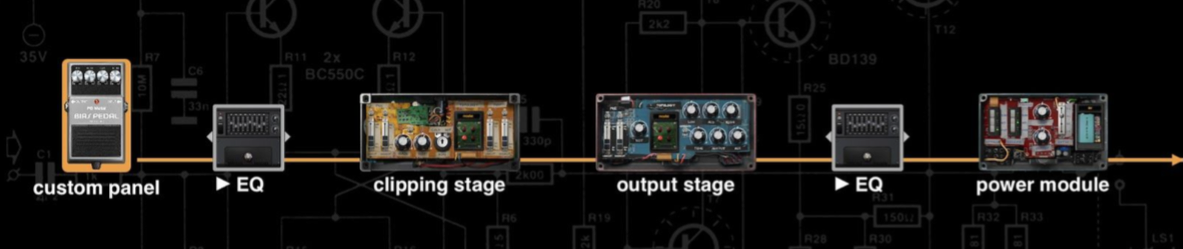
We visualize the process of the distortion shaping the tone.
-
Custom Panel - Shows the looks of the pedal
-
EQ 1 - There are 3 different EQ modules to choose from (Studio EQ, Graphic EQ, Parametric EQ)
-
Clipping Stage - Controls the distortion process
-
Output Stage - Controls the tone shaping process
-
EQ 2 - There are 3 different EQ module to choose from (Studio EQ, Graphic EQ, Parametric EQ)
-
Power Module - Controls the compression and output level
Settings Menu
-
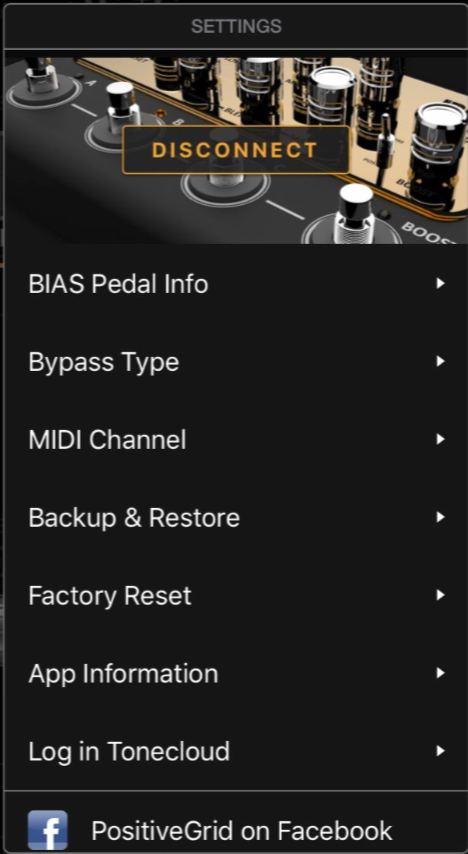
Disconnect
Disconnect with the BIAS Distortion pedal -
Device Info
Includes Device name, rename, S/N and firmware upgrade -
Bypass Type
Choose from True Bypass or Buffer Bypass for BIAS Distortion Pro -
MIDI Channel
Set the MIDI Channel -
Backup & Restore
Backup all the presets from device in app. You can restore to any other BIAS Distortion Pro. Up to 5 backups -
Factory Reset
Allows you to reset the device to factory default -
App Information
Including Factory Reset (local), app version and other information